Trying to use the SI.WRITEBACK formula to load monthly headcount data into a statistical account. Having all sorts of problems figuring out the right inputs for the formula based on our setup. Does anyone have a template or something they could share!
Thanks!
0 Votes
8 Comments
Sorted by
Gabriel Michaudposted
10 months ago
Can you ask your administator to try the same using an admin account in Velixo? He could then compare your permissions with those of another user who's able to use the writeback feature.
Even though you have access from the main product web interface, it's possible that there's slightly different permissions needed to do this from an external application like Velixo. We're happy to help troubleshoot this further on a Teams call if it helps.
0 Votes
K
Khansenposted
10 months ago
So I'm just using my regular Sage account that is assigned to me. I am able to use the budget writeback function to update the 2026 budget headcount. I went into Sage just now and was able to update the headcount for November using the below screen:
Not sure if this helps? Appreciate all the help!!
0 Votes
Gabriel Michaudposted
10 months ago
Thanks for your response. I don't think it has to do with the posting itself, it looks like the account you're using to connect to Sage Intacct doesn't have the necessary permissions to even create a new batch. Is this a regular Sage Intacct account, or a web services user? Can you create this journal transaction manually from the browser using the same account?
0 Votes
K
Khansenposted
10 months ago
Thanks... I was able to check the error using the formula error checking in Excel. It said that the currency was required, so I put in USD then the status changed to Pending. When I clicked writeback, I got the following error:
This seems to indicate I don't have the appropriate permissions in Sage to post?
0 Votes
Gabriel Michaudposted
10 months ago
@Khansen if you hover the cell showing #VALUE! and move your mouse above the "!" icon, what do you see?
You can also click the "Status" button to see errors:
0 Votes
K
Khansenposted
10 months ago
Hi Gabriel,
Thanks so much for your help! When I populate the various fields in the template, the Status column turns to #VALUE! whenever I enter info in the Account column. If I delete info in the Account column and populate other data, I don't get this error - only when I put in an account number. I verified the account number is correct - any idea what might be going on?
[I deleted my earlier answer since it was not accurate - everything works as expected using the method described below]
Hi,
The easiest way to load data into statistical accounts should be to use the Journal Writeback feature (SI.WRITEBACKJOURNAL). Velixo can create a writeback template for you by selecting the Insert->Journal Transaction option:
You then need to enter your statistical journal symbol in the "Journal" cell. In my case, i'm using the "STC" journal:
After writing back, you'll see the same transaction in the Statistical Journal Entries section:
The only required fields besides the journal symbol are the description, the statistical account, and the location.
0 Votes
Hi -
Trying to use the SI.WRITEBACK formula to load monthly headcount data into a statistical account. Having all sorts of problems figuring out the right inputs for the formula based on our setup. Does anyone have a template or something they could share!
Thanks!
0 Votes
8 Comments
Gabriel Michaud posted 10 months ago
Can you ask your administator to try the same using an admin account in Velixo? He could then compare your permissions with those of another user who's able to use the writeback feature.
Even though you have access from the main product web interface, it's possible that there's slightly different permissions needed to do this from an external application like Velixo. We're happy to help troubleshoot this further on a Teams call if it helps.
0 Votes
Khansen posted 10 months ago
So I'm just using my regular Sage account that is assigned to me. I am able to use the budget writeback function to update the 2026 budget headcount. I went into Sage just now and was able to update the headcount for November using the below screen:
Not sure if this helps? Appreciate all the help!!
0 Votes
Gabriel Michaud posted 10 months ago
Thanks for your response. I don't think it has to do with the posting itself, it looks like the account you're using to connect to Sage Intacct doesn't have the necessary permissions to even create a new batch. Is this a regular Sage Intacct account, or a web services user? Can you create this journal transaction manually from the browser using the same account?
0 Votes
Khansen posted 10 months ago
Thanks... I was able to check the error using the formula error checking in Excel. It said that the currency was required, so I put in USD then the status changed to Pending. When I clicked writeback, I got the following error:
This seems to indicate I don't have the appropriate permissions in Sage to post?
0 Votes
Gabriel Michaud posted 10 months ago
@Khansen if you hover the cell showing #VALUE! and move your mouse above the "!" icon, what do you see?
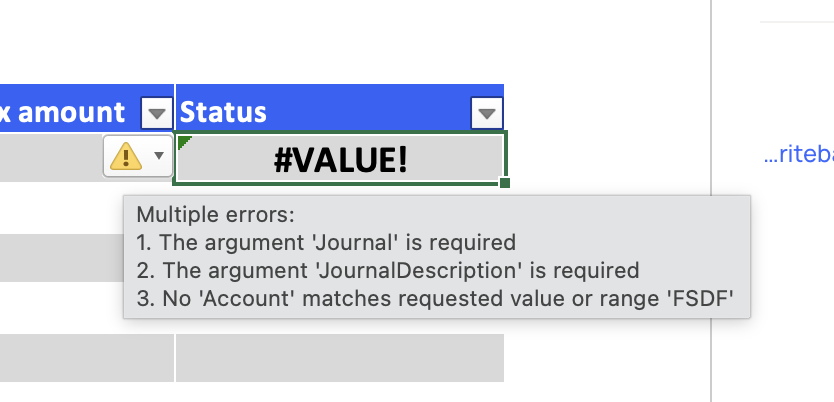
You can also click the "Status" button to see errors:
0 Votes
Khansen posted 10 months ago
Hi Gabriel,
Thanks so much for your help! When I populate the various fields in the template, the Status column turns to #VALUE! whenever I enter info in the Account column. If I delete info in the Account column and populate other data, I don't get this error - only when I put in an account number. I verified the account number is correct - any idea what might be going on?
0 Votes
Gabriel Michaud posted 10 months ago
Here's a video demonstrating the use of writeback and statistical accounts with Velixo: https://www.loom.com/share/0e17685222d7477794fa3f7e1b5e1265
0 Votes
Gabriel Michaud posted 10 months ago
[I deleted my earlier answer since it was not accurate - everything works as expected using the method described below]
Hi,
The easiest way to load data into statistical accounts should be to use the Journal Writeback feature (SI.WRITEBACKJOURNAL). Velixo can create a writeback template for you by selecting the Insert->Journal Transaction option:
You then need to enter your statistical journal symbol in the "Journal" cell. In my case, i'm using the "STC" journal:
After writing back, you'll see the same transaction in the Statistical Journal Entries section:
The only required fields besides the journal symbol are the description, the statistical account, and the location.
0 Votes
Login or Sign up to post a comment